

%20(1)-1.png?width=1618&height=938&name=Social%20Media%20Ads%20(1080%20%C3%97%20500%20px)%20(1)-1.png "Screenshot collage of ClassReach school management software showing School Overview dashboard, Forms Creator, Messaging inbox, School Calendar, Documents interface, and Discussions on multiple devices.")
School Management Software For Private K-12 Schools
ClassReach is the all-in-one school management software platform designed specifically for small-to-mid-sized private K-12 schools, including Christian and classical academies.
We help you run your k12 school, by unifying your student information system, learning management software, billing, and communication tools into one intuitive system. From application to graduation, our platform empowers your lean team to stop juggling administrative tasks and start focusing on your school's mission.

What is an all in one school management software?
School management software is the digital backbone of a thriving school. It acts as a centralized platform that replaces the fragmented, "puzzle-piece" approach of using separate, non-integrated apps for gradebooks, tuition billing, enrollment, and messaging. By unifying these functions into one system with a single login, ClassReach removes the operational friction that slows your team down.
-1.png "Screenshot showing a parent receiving a teacher message about their student, within ClassReach and a \"Reply\" button.")
Why Schools Switch To ClassREach
Schools often outgrow spreadsheets and disconnected systems because they create "admin drag"—the hidden operational cost of syncing data between tools that don't talk to each other. The ClassReach school management system offers a better way to manage your school's operations:
- Unified Ecosystem: Manage your entire school—SIS, LMS, and billing—without expensive third-party integrations.
- One Login, Every Role: Provide parents, staff, and students with exactly what they need in one place through a single user login, eliminating the frustration of managing multiple accounts.
- Built for Lean Teams: Our intuitive UX is designed for small administrative teams, avoiding the bloat of district-level enterprise platforms.
- Transparent Pricing: Budget with confidence. Review pricing and plans before you buy.
Learn about the hidden costs of using multiple school systems.
Everything your school needs, in one platform
ClassReach gives school administrators access to proactive, innovative tools that contribute to the smooth operation of your entire school. Instead of jumping between disconnected apps, your school administrators can work from one platform with one consistent experience.
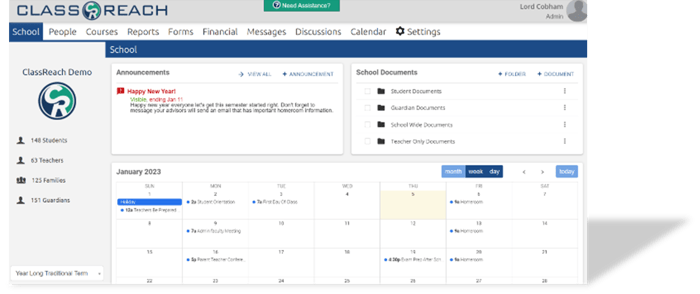
School Operations Dashboard
Get a clearer view of school operations from one administrator portal. ClassReach helps your team monitor announcements, review school-wide activity, and access the information needed to keep daily operations organized and moving forward.
- View school-wide announcements and updates.
- Access monthly calendar activity in one place.
- Keep vital school information organized and visible.
Documents and records
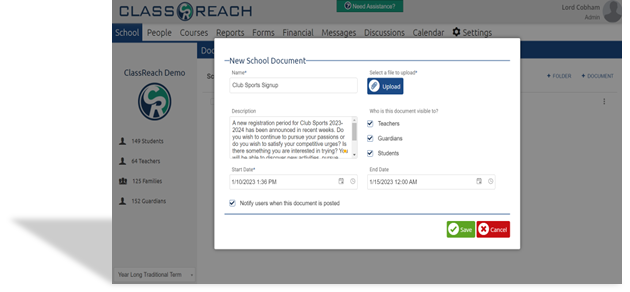
Maintain a cleaner, more accessible digital file system. With configurable folder structures, visibility settings, and easy access to student information. ClassReach helps you reduce printing, simplify documentation, and save valuable time for your faculty.
- Store important school and student data digitally.
- Control access with role-based visibility settings.
- Eliminate paper costs with a simplified file system.
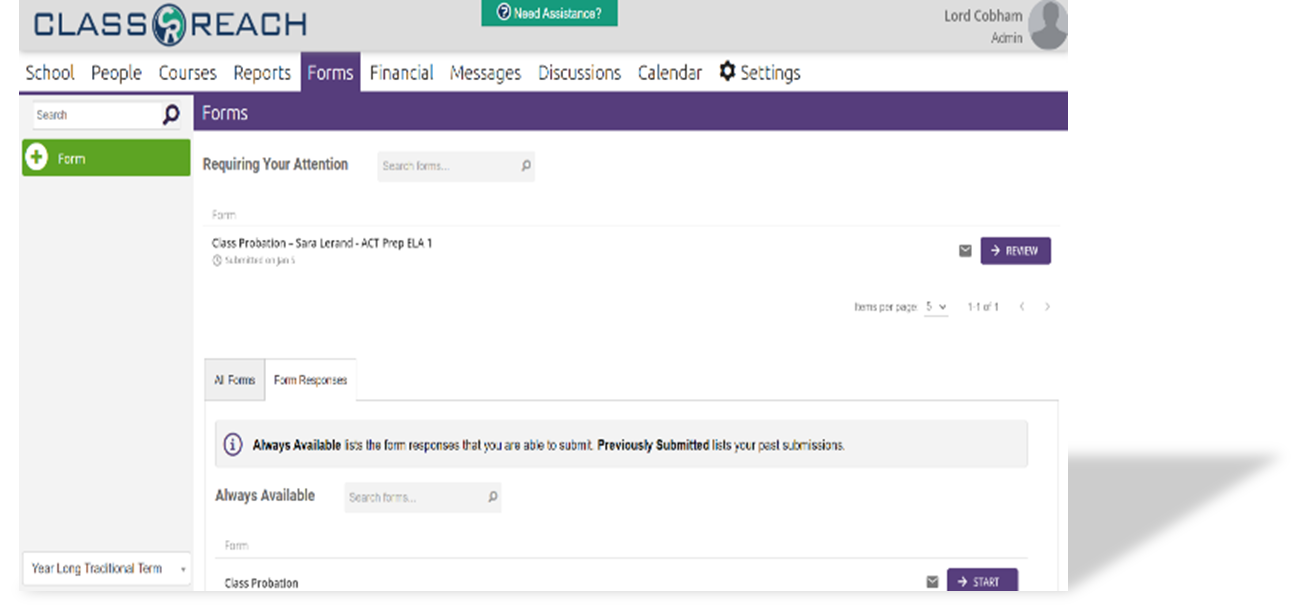
Forms, workflows, and payments
Create forms that do more than collect information. ClassReach helps schools build customized forms, generate reports from responses, and connect workflows and tuition payments in one streamlined experience. Learn more about our forms creator.
- Create and share customized professional forms.
- Build reports and track responses automatically.
- Enable payments and workflows inside the form experience.
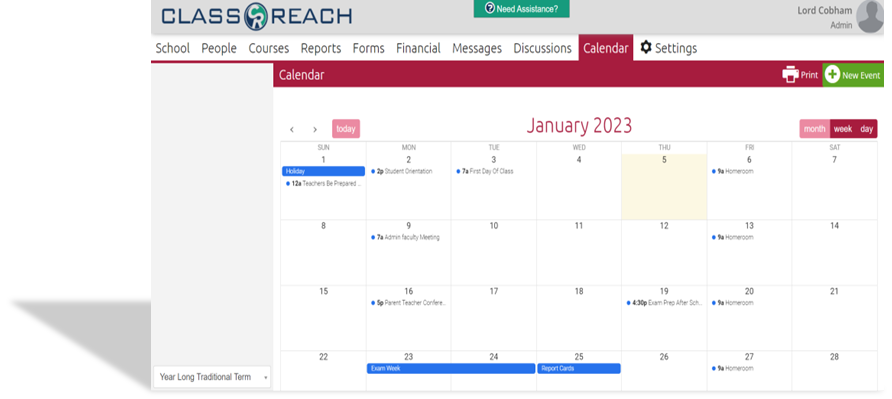
Calendar and coordination
Keep your school schedule organized with a shared calendar that is easy to update and easy to use. Staff can configure school events, filter views by role, and manage schedules more efficiently across the academic year.
- Configure and update events quickly.
- View schedules by month or week.
- Filter calendar information by role for a customized view.
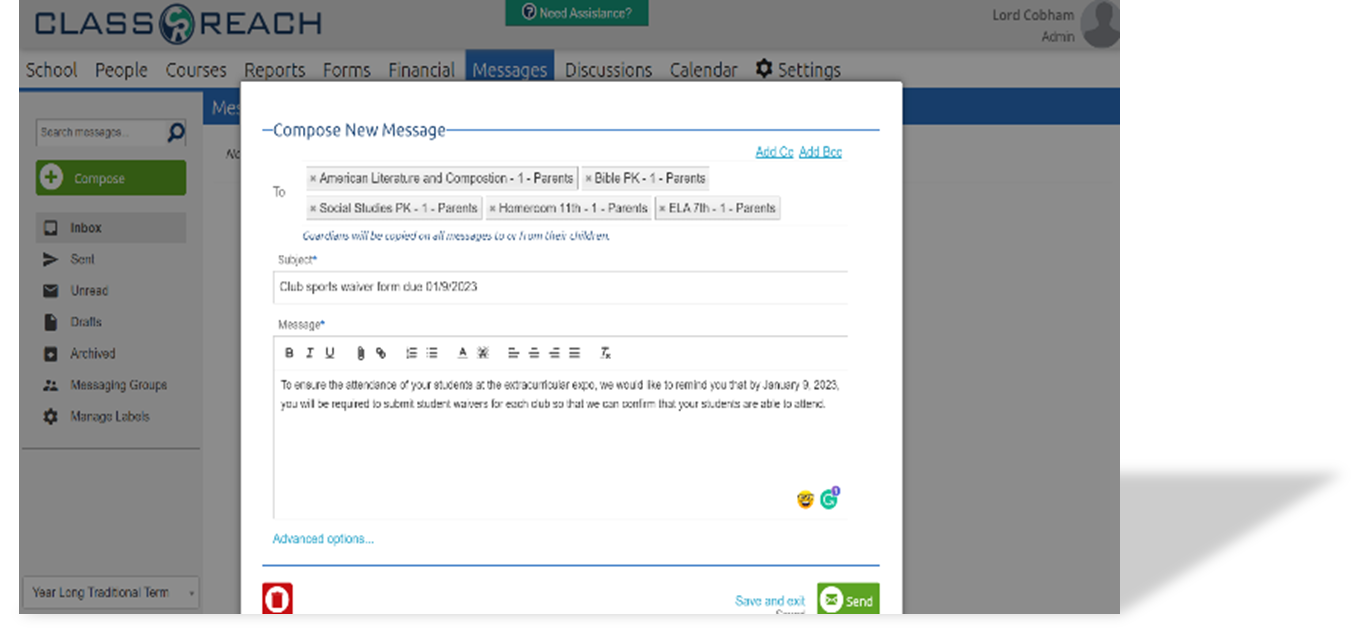
Messaging and family communication
Improve parent engagement without creating more communication overload. With built-in messaging, announcements, and discussion tools, ClassReach helps schools keep families informed about student success and your school administration aligned from one central platform.
- Send, receive, and archive messages with ease.
- Use prebuilt groups or create your own custom lists.
- Use "message copy" to stay informed of communications between staff and students.
Discussions and community alignment
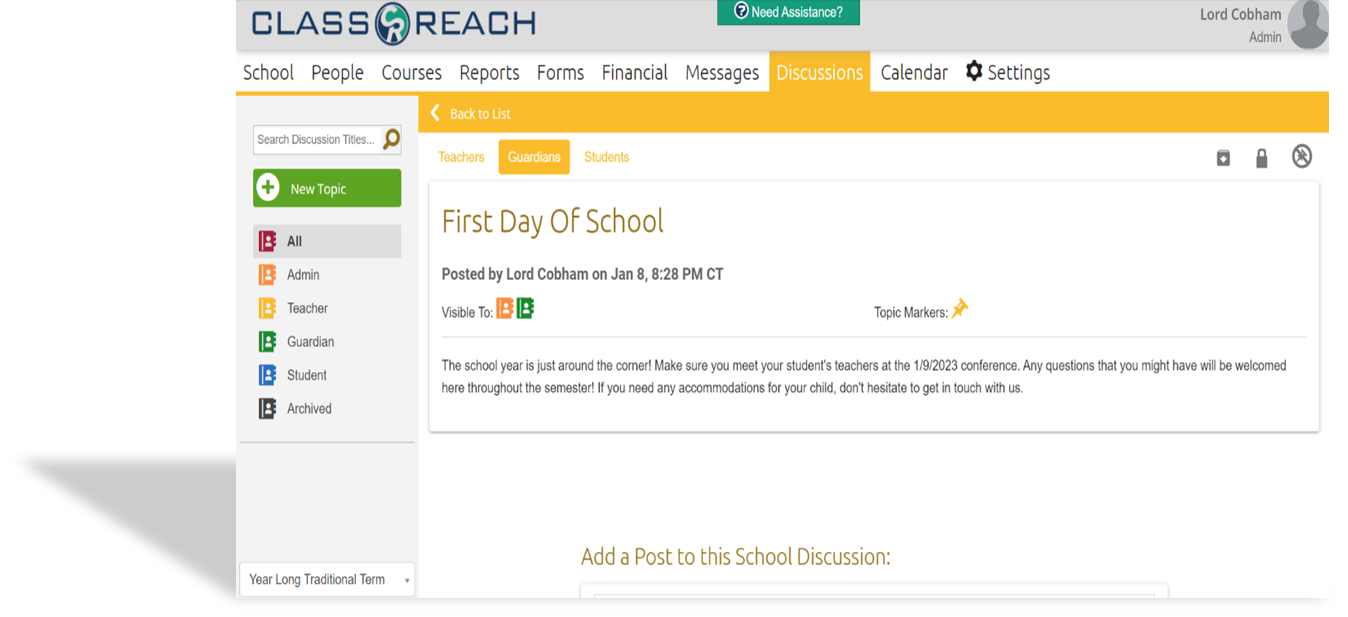
Support stronger collaboration across your school community with a structured discussion tool. Teams can gather feedback, organize conversations, and keep the right people informed with role-based visibility and moderation tools.
- Filter discussion visibility by user role.
- Pin and archive important conversations for the community.
- Use post-date filters to keep information relevant.
Support that feels like a partnership
Implementation delays are a common stress point for a school leader, but ClassReach is different. We provide fast, guided onboarding tailored to your timeline. Our support is inclusive and responsive, ensuring your team feels supported—not sold to—well after your launch.
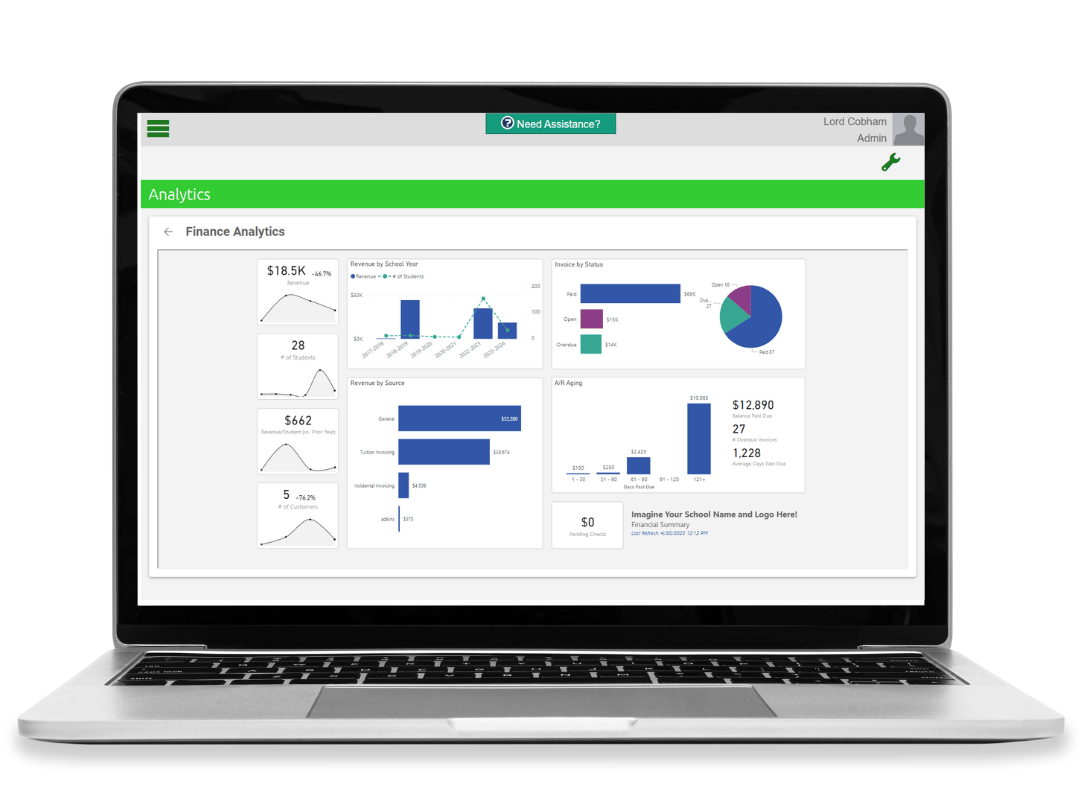
Built-in visibility for better decisions
You cannot improve what you cannot clearly see. ClassReach Basic includes built-in analytics and dashboards that help administrators monitor enrollment trends, attendance patterns, and financial health in real-time, enabling confident decision-making without technical complexity. See data-driven analytics.
- What makes ClassReach different from other platforms?
-
ClassReach is purpose-built for the unique culture of small-to-mid-sized private schools. We prioritize an all-in-one unified system with transparent pricing and fast, hands-on onboarding.
- Does ClassReach include an SIS, LMS, and billing in one system?
-
Yes. ClassReach unifies your student information system, learning management software, tuition billing, parent communication, and transcripts into a single platform with one login for all users.
- What is the true cost of school management software?
-
The true cost goes beyond the monthly subscription. Many private schools pay for multiple disconnected tools—each with its own license, training time, support needs, and integration challenges. Learn about the hidden costs of using multiple school systems. These hidden costs add up in staff hours, inefficiencies, and data silos.
ClassReach uses an all-in-one, transparent pricing model, so schools avoid paying for overlapping systems and reduce administrative workload. By consolidating tools into a single platform with one login, schools save both time and money while gaining better operational control.
- What features should a school management system include?
-
A school management system for private k-12 schools should include attendance tracking, gradebooks, report cards, parent communication, billing, and built-in analytics. Platforms that combine these features—like ClassReach tend to be more efficient than using multiple disconnected tools.
- How do I choose the best school management software?
-
Look for platforms with unified student information System/learning management system functionality that has mobile access, role-based permissions, transparent pricing, and fast onboarding.
ClassReach stands out for private schools because it consolidates these capabilities into one intuitive platform without add-on fees or complex setup.
To see how this could work at your private school, read the School Management Systems Guide or schedule a quick ClassReach walkthrough today.
- What is the difference between SIS and school management software?
-
A Student Information System (SIS) focuses on student records and demographics, while school management software adds billing, communication, forms, calendars, and analytics.
- How much does school management software cost for a small school?
-
Expect $2,000–$20,000 annually depending on enrollment size.
ClassReach offers transparent, student-based pricing starting at $175/month for schools with 0–50 students, including all lite starter features.
- Can school management software work on mobile devices?
-
Yes. The best platforms offer responsive web apps or native mobile access. ClassReach provides full mobile functionality for admins, teachers, and parents to manage attendance, messaging, calendars, and forms from any device without downloading separate apps.
- How does school management software improve parent communication?
-
Effective systems include messaging, announcements, calendars, and parent portals that reduce email overload.
ClassReach lets your private school send targeted updates, track message delivery, and create discussion forums, helping families stay connected without creating more admin work.
To see how this could work at your private school, explore the ClassReach Messaging feature and read the “Power of Messaging is K12 Schools”
https://classreach.com/blog/the-power-of-messaging-in-k12-schools
Is ClassReach the right school management system for your school?
ClassReach is built for private K–12 schools that want to replace disconnected systems with one unified school management platform. Instead of juggling separate tools for student information, billing, communication, forms, and academics, schools can manage daily operations from a single system designed for lean administrative teams .
If your school is actively comparing school management software vendors, schedule a personalized demo or explore transparent pricing to evaluate if ClassReach fits your workflows before deciding .
ClassReach is designed for schools that are:
- Managing student data, billing, communication, and forms across multiple systems that do not integrate well. Many private schools discover that disconnected platforms create unnecessary administrative workload, duplicate data entry, and hidden operational costs .
- A small-to-mid-sized private school where administrators and staff need to accomplish more with limited time and resources. ClassReach Lite offers an intuitive all-in-one system without enterprise-level complexity .
- Looking to reduce software costs by consolidating overlapping subscriptions into one platform with transparent pricing and predictable onboarding .
- Frustrated with complex school management systems that require long implementation timelines, difficult training processes, or ongoing technical maintenance. ClassReach prioritizes fast onboarding and responsive support tailored to private schools, as shown in our implementation guide .
- Ready to move away from spreadsheets, outdated SIS platforms, or disconnected school software that slows down communication, reporting, and day-to-day operations.
Why Schools Switch to ClassReach
Private schools often choose ClassReach because it helps reduce administrative friction by replacing multiple disconnected systems with one centralized platform. Schools can simplify parent communication, improve operational visibility, reduce training overhead, and manage daily workflows more efficiently from a single login—see real results in our Wylie Prep case study and Logos Online case study .
If your school is evaluating alternatives to fragmented school software systems, schedule a personalized ClassReach demo today to compare workflows, onboarding expectations, and pricing based on your school’s size and operational needs .
Ready to Streamline Your School Operations?
Stop juggling disconnected tools and start using a platform built for your mission. Review our transparent pricing or schedule a personalized demo today to see how ClassReach simplifies daily operations for your k 12 school.